The most exciting new feature in SharePoint 2013 for an old web developer like me is the embracing of JavaScripting, JQuery and open standards. Now more and more of what is done will be done in JavaScript, a language almost all developers know, and less in C#
Tuesday, 22 October 2013
Thursday, 17 October 2013
Microsoft Office embraces the concept of Apps
The concept of the app, a small piece of special purpose code sold or distributed on the web, is catching on to Microsoft. The greatest thing about the new app model for Office and SharePoint 2013 is not only is it built on web standards like HTML 5, CSS and JavaScript, but it is sold and distributed in a business model people will easily understand: the app store.
You can buy an app on an app store, or have one developed to special task either inserted directly in to the tools you use like Excel or on SharePoint.
I personally am looking at Excel apps, as I think for Big Data this is going to be a killer app.


Apps model for Office and SharePoint 2013
Things are changing in the App world for SharePoint, Microsoft is doing what it does best, copying what other people have already made. And Office and SharePoint are embracing the App model based on open web standards.
Wednesday, 16 October 2013
Office 365 makes the iPad a work tool

We all know that iPads and Android tables are great. But we also almost all have felt that these new tools sadly are not so useful at work. I have found that Office 365 actually can bridge the gap, allowing me to use my iPads as a tool to create documents, wikis, lists and links in my iPad.

I am currently working with SharePoint in Office 365. Though full use of Office 365 on iPad is not possible. Office 365 needs Napa which does not run on any of the browsers, and you can't open Office documents. But, if you configure you SharePoint site to open documents in browsers an Office 365 site will let you suddenly turn an iPad in to a enterprise productivity tool with all of major Office features.

Thursday, 5 September 2013
Agile failed for Universal Credit, and perhaps is not right for government (opinion)
Computer Weekly asks why agile development failed for Universal Credit and gives a fairly powerful answer.
Its a shame that the article is so long, because the summing up points are not that complex and ones that people in IT and Government should be able to see.
Agile is a method that came out of academic, R&D and some corporate IT. At the core of Agile is out modern age's embracing of uncertainty and change. In an Agile project you might decide to build A for $20,000 but end up getting B. In the past this was called mission creep, but as time evolves we are more and more likely to see it as a good thing, as Agile.
I think the first thing I learned in software as a business is that one person's bug is another persons feature. Much of what we do in software is setting up value systems and criteria by which we are going to judge software.
Another thing I learned the hard way is that these criteria need to be appropriate for the group which is going to use the IT.
Its seems obvious that the new government that came to power in 2010 in the UK wanted to, as so many new governments do, adopt some new cost saving concepts from the business sector. For IT the buzz for some time has been Agile as a way to save money and speed up development time.
Agile is hard to precisely define but overall its a reaction against classic Waterfall, where a set of requirements create a design lead to a build, go through testing and go live. This fix cost, fixed outcome model has been standard for a long time and has become hated by just about everyone in IT and business.
As cheaper computers and then virtual machines came along the sector embraced more agility. The core idea was that rather than Waterfalls fixed concept of fixed features, fixed time frames and fixed cost you could do a better job allowing one to vary. So if you have fixed casts you can decide to get a fixed set of features but allow the project time frames to change, or you can fix time frames but review features over time.
It seemed like just a confession of reality, Waterfall projects are infamous for over running in either time or cost, or not delivering everything promised.
The problem for DWP, and any big government agency is that the role of government is not agility. I would go beyond most critics in saying government does not get Agile, and I would say that the role of government means they should not get Agile.
We live in a Capitalist society of constant change, our culture is reworking itself at amazing speed and with this constant innovation culture we have created great wealth but also great risks. The financial collapse of 2008 can probably be viewed as an inability of Capitalism to self regulate the risks innovation in Financial institutions created.
So the role of government is precisely to not innovate. Government is the gate keeper, society needs a stable fixed point in a sea of innovation. Its the very fact that Government culture is so static, so unwilling to change and so political that gives it so essential value to the larger society. We live in a world of innovation to the point of self destruction, and when we create chaos we need the rigid institutions of government to maintain stability.
So the deal is this, private sector can provide innovative experience and cost saving to government and it should, but IT service providers need to acknowledge what government is, and politicians in opposition hoping to take power have to understand that radical reforms in the way government work have a almost 100% failure rate.
The more we embrace change the more we need to count on institutions of stability. Its the very rigid culture of government that makes it valuable to our chaotic economic system.
Its a shame that the article is so long, because the summing up points are not that complex and ones that people in IT and Government should be able to see.
Agile is a method that came out of academic, R&D and some corporate IT. At the core of Agile is out modern age's embracing of uncertainty and change. In an Agile project you might decide to build A for $20,000 but end up getting B. In the past this was called mission creep, but as time evolves we are more and more likely to see it as a good thing, as Agile.
I think the first thing I learned in software as a business is that one person's bug is another persons feature. Much of what we do in software is setting up value systems and criteria by which we are going to judge software.
Another thing I learned the hard way is that these criteria need to be appropriate for the group which is going to use the IT.
Its seems obvious that the new government that came to power in 2010 in the UK wanted to, as so many new governments do, adopt some new cost saving concepts from the business sector. For IT the buzz for some time has been Agile as a way to save money and speed up development time.
Agile is hard to precisely define but overall its a reaction against classic Waterfall, where a set of requirements create a design lead to a build, go through testing and go live. This fix cost, fixed outcome model has been standard for a long time and has become hated by just about everyone in IT and business.
As cheaper computers and then virtual machines came along the sector embraced more agility. The core idea was that rather than Waterfalls fixed concept of fixed features, fixed time frames and fixed cost you could do a better job allowing one to vary. So if you have fixed casts you can decide to get a fixed set of features but allow the project time frames to change, or you can fix time frames but review features over time.
It seemed like just a confession of reality, Waterfall projects are infamous for over running in either time or cost, or not delivering everything promised.
The problem for DWP, and any big government agency is that the role of government is not agility. I would go beyond most critics in saying government does not get Agile, and I would say that the role of government means they should not get Agile.
We live in a Capitalist society of constant change, our culture is reworking itself at amazing speed and with this constant innovation culture we have created great wealth but also great risks. The financial collapse of 2008 can probably be viewed as an inability of Capitalism to self regulate the risks innovation in Financial institutions created.
So the role of government is precisely to not innovate. Government is the gate keeper, society needs a stable fixed point in a sea of innovation. Its the very fact that Government culture is so static, so unwilling to change and so political that gives it so essential value to the larger society. We live in a world of innovation to the point of self destruction, and when we create chaos we need the rigid institutions of government to maintain stability.
So the deal is this, private sector can provide innovative experience and cost saving to government and it should, but IT service providers need to acknowledge what government is, and politicians in opposition hoping to take power have to understand that radical reforms in the way government work have a almost 100% failure rate.
The more we embrace change the more we need to count on institutions of stability. Its the very rigid culture of government that makes it valuable to our chaotic economic system.
Tuesday, 14 May 2013
DocAve for AvePoint is a simpler alternative to RBS
One of the limitations of OTB SharePoint, including 2013, is that everything is stored in SQL Server. When you are dealing with large files or lots of files this can become expensive to the point of unsupportable. For example SharePoint won't support files over 2 GB, and yet in our world of audio, photo and video media a 2 GB presentation is not unheard of.
People are often just keeping their really big files like movies, podcasts and computer designs outside of SharePoint. But DocAve File Share Navigator from AvePoint promises to allow you to expose your file shares in side of SharePoint. This is not only a cheap and dirty alternative to simple RBS requirements, but it can mean that if you have lots of large files you can still have SharePoint as your team and project portal.
Wednesday, 10 April 2013
Kung Fu Migration to Windows Azure SQL Database
Video above of Scott Klien presentation that I will be seeing in London this evening.
Tuesday, 11 December 2012
Video mashup intro to SharePoint
Here are some videos to give an introduction to SharePoint
A very basic introduction to using SharePoint 2007, the information is also valid at this level in SharePoint 2010 and 2013.
This is a good high level overview of what SharePoint can give to a business. If your boss asks you 'what is Sharepoint used for?' this is pretty good. Not very technical though.
A good use case of for SharePoint 2010 from Get Started with SharePoint. Get Started with SharePoint is probably the best place to get videos on SharePoint for users and power users.
This site gives a good introduction to making a basic 2007 SharePoint site. This comes from SharePoint training site which has a lot of good information.
Labels:
introductions,
SharePoint,
videos

Wednesday, 7 November 2012
Configuring the Web Application in SharePoint 2010, an overview
This blog post will cover how you configure a new Web Application. This section tells you how to create a Web Application in SharePoint 2010.

Configuring the Web Application
General Settings 1. Firstly, the following settings need to be applied in the “General Settings” of the web application.

General setting is pretty self explanatory, with instructions if you have any questions.

Resource Throttling this is a feature that would normally be considered for a full live service to help manage the performance of the service.
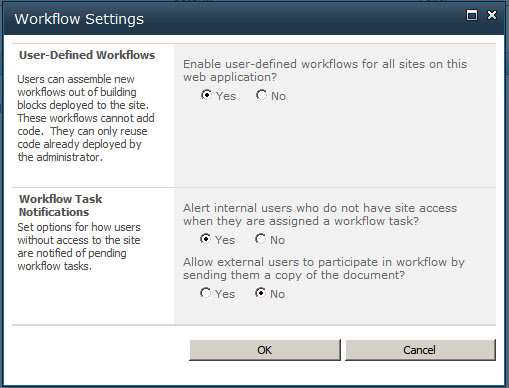
Workflow where you can enable workflow for the farm.

Outgoing E-Mail is configured as a farm-wide service

Mobile Account these settings would normally be used to provision mobile SMS messaging from a SharePoint web site.

SharePoint Designer Settings allow you to turn on or off SharePoint Designer Access. Unless you really need SharePoint Designer turn these off.
Friday, 2 November 2012




Thursday, 1 November 2012
Create a Context Sensitive Navigation Wiki with SharePoint 2010 Foundation Part 1
This blog post will cover the first part of building a context sensitive navigation system with SharePoint 2010 Foundation Wiki.
In a Context sensitive site the links on the side navigation are different for different links on the top navigation. With out of the box SharePoint Foundation the best way to do this is to make each top navigation tab its own sub-site. This means that rather than having 1 wiki you have a separate wiki for each tab. So you need to decide if this will work for you first.
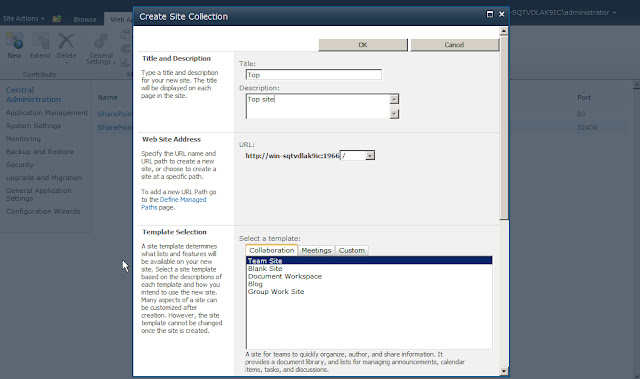 |
| First Create A New Site Collection to site in a SharePoint Web Application. The site we will create is a Team Site. We will make the system administrator the administrator of the site. |
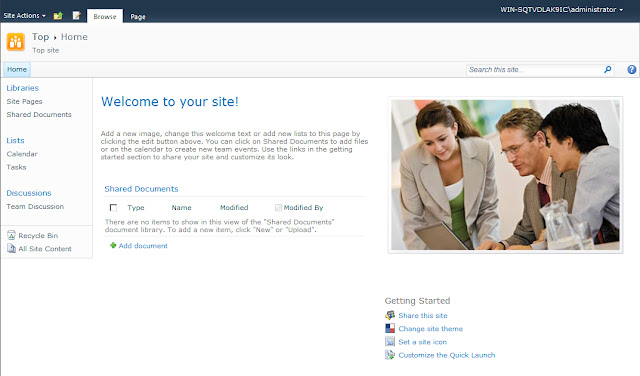 |
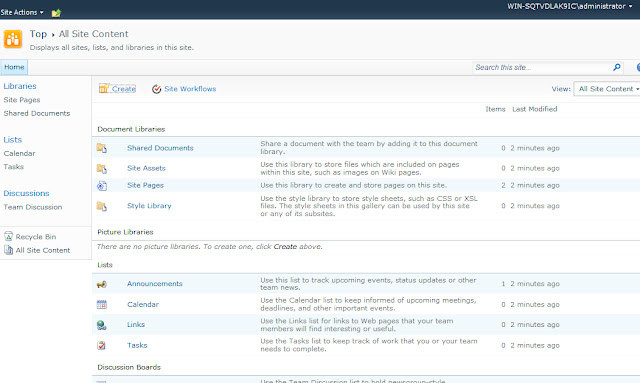
| This creates a SharePoint Team. We are going to change this to a Wiki, so first we selection Site Actions and Show All Site Content. |
Key Step 1: Make a Team Site in to a Wiki Site
 |
| With the All Site Content Page showing we select Create at the top of the table, this will bring up a creation page. |
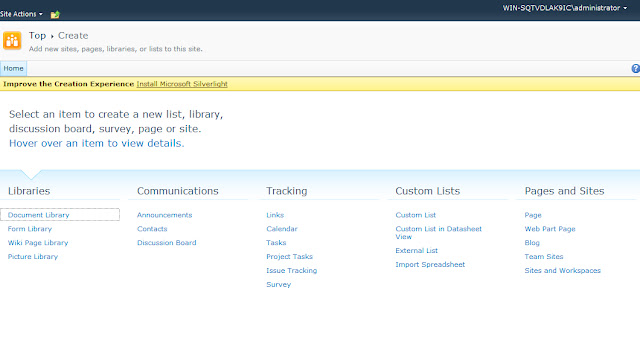 | ||
On the SharePoint Create page we will select Wiki Page Library
|
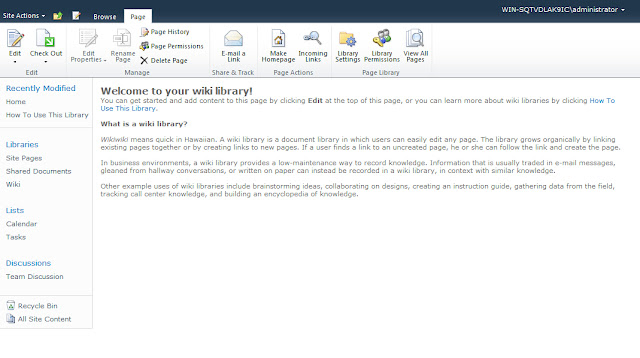
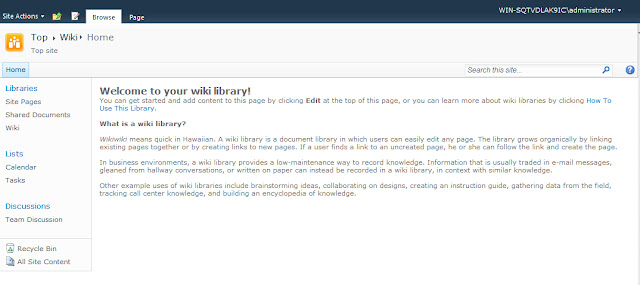 |
| This has made the Wiki Home Page the Home page of the site. Now to add new tabs across the top we are going to create new Sub Sites. Again click Site Actions and New Site to create a new Sub Site. Be certain that you are at the top of the Site Collection each time you do this. |
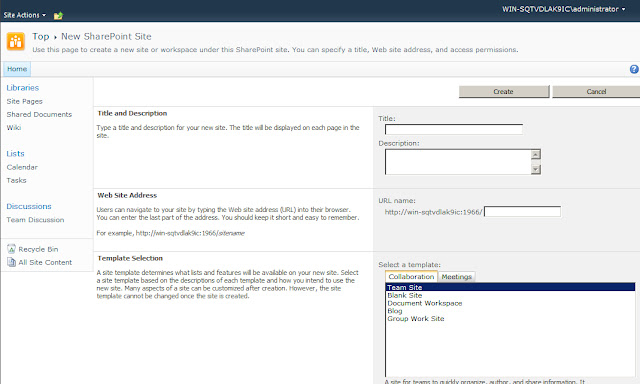 |
| Provide Title, Description and URL for the new sub Site. The Title will show up on the top navigation. Select Team Site. |
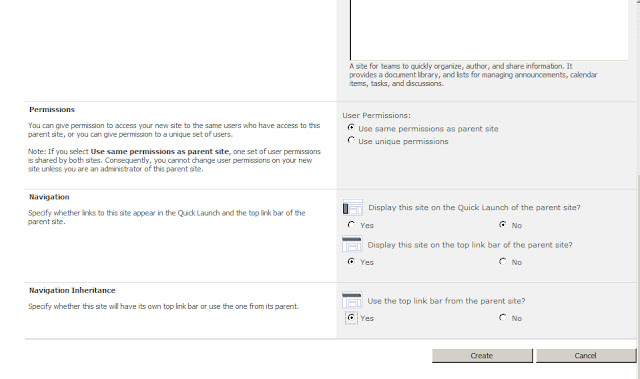 |
| Make certain that you Select Display this site on the top link bar of parent site and Use the top link bar from the parent site. |
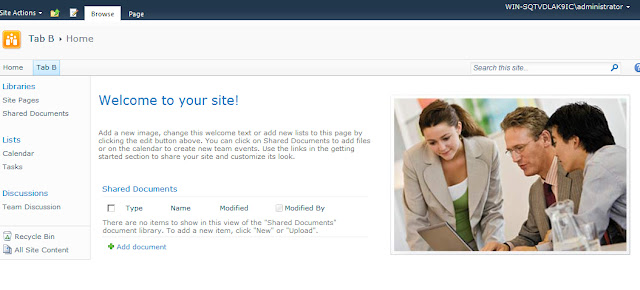 |
| Now you have created a new Sub Site. Perform Key Step 1 to convert this in to a Wiki Site. |
 |
| Continue until you have created all the top navigation elements. |
Wednesday, 31 October 2012
Create and Edit a Wiki in SharePoint Foundation
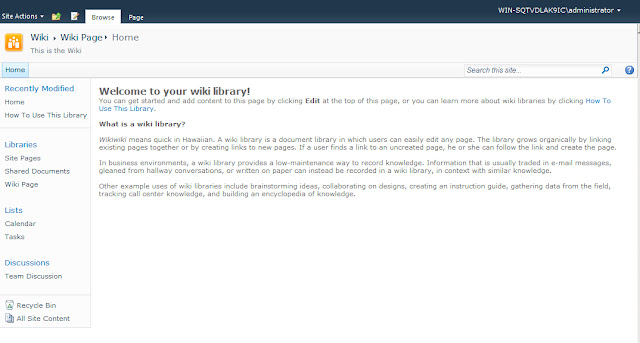 |
| First start with the Home page of the wiki, or any page in the Wiki where you hope to create a new page. Click the Page tab on the top right hand side of the page. If you don't have a Page tab you don't have rights to edit the page. |
 | ||
Clicking page brings up SharePoint's Ribbon. Click View All Pages in the Ribbon to see a List of All Pages in the Wiki
|

 |
| To Add a new wiki page click the Add New Page link at the bottom of the list. Provide a title for the Wiki page. Be careful to not make any typos in the title, as it is will be used as the Wiki page name even if you change the title in the future. Click create. |
 | ||
This creates a new blank wiki page. It is critical that if you are going to paste text in to the page you use the Paste, Pates plaintext link in the Ribbon. If you just use Ctrl -V to paste text you will carry over formatting from the original document, that can make you page look inconsistent, be hard to manage, and maybe not even show up properly on some machines.
|

 |
| To add a href link to any web page on the Internet or intranet, you click Insert, highlight the text and click Link. |
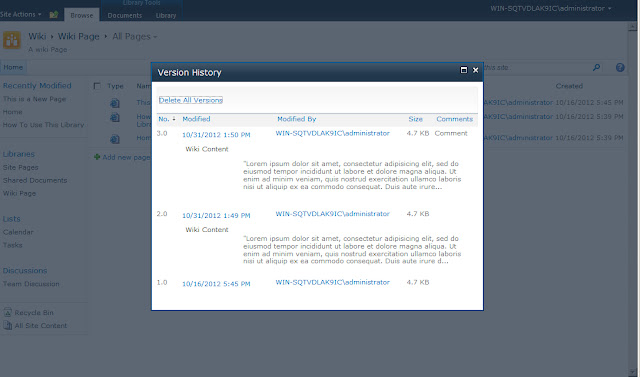 |
| With version control turned on for Wikis each check-in creates a new version. You can view version history by going to the Wiki Library, mousing over a item and right mousing clicking. From the menu that shows up select Version history. |
Labels:
edit,
SharePoint,
wiki
Subscribe to:
Posts (Atom)